



Источник: progblog
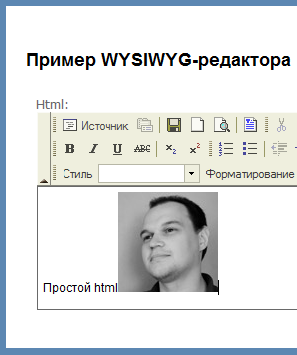
Для работы понадобятся:
- FCKeditor 2.6.4
- FCKeditor.Net
Далее просто добавляем в проект папку "fck" со скриптами. И подключаем fckeditor.js в мастер странице.
- <script src="<%=ResolveUrl("~/Scripts/fck/fckeditor.js") %>" type="text/javascript"></script>
<script src="<%=ResolveUrl("~/Scripts/fck/fckeditor.js") %>" type="text/javascript"></script>
Во view рендерим textarea с id="HtmlContent", и прописываем клиентский код инициализации:
- <script type="text/javascript">
- window.onload = function() {
- var sBasePath = '<%= ResolveUrl("~/Scripts/fck/") %>';
- var oFCKeditor = new FCKeditor('HtmlContent');
- oFCKeditor.Config.Enabled = true;
- oFCKeditor.Config.UserFilesPath = '/Content/UserImages';
- oFCKeditor.Config.UserFilesAbsolutePath = '/Content/UserImages';
- oFCKeditor.Height = '200';
- oFCKeditor.BasePath = sBasePath;
- oFCKeditor.ReplaceTextarea();
- }
- </script>
 <script type="text/javascript">
        window.onload = function() {
            var sBasePath = '<%= ResolveUrl("~/Scripts/fck/") %>';
            var oFCKeditor = new FCKeditor('HtmlContent');
            oFCKeditor.Config.Enabled = true;
            oFCKeditor.Config.UserFilesPath = '/Content/UserImages';
            oFCKeditor.Config.UserFilesAbsolutePath = '/Content/UserImages';

            oFCKeditor.Height = '200';
            oFCKeditor.BasePath = sBasePath;
            oFCKeditor.ReplaceTextarea();

        }
    </script>
Папка "/Content/UserImages" указана для загрузки изображений. Также необходимо еще добавить reference на FredCK.FCKeditorV2.dll. Для того, чтобы работал загрузчик изображений заходим в "/Scripts/fck/filemanager/connectors/aspx/config.ascx". В методе CheckAuthentication возвращаем true. А в методе SetConfig указываем:
- // URL path to user files.
- UserFilesPath = "/Content/UserImages/";
- // The connector tries to resolve the above UserFilesPath automatically.
- // Use the following setting it you prefer to explicitely specify the
- // absolute path. Examples: 'C:\\MySite\\userfiles\\' or '/root/mysite/userfiles/'.
- // Attention: The above 'UserFilesPath' URL must point to the same directory.
- UserFilesAbsolutePath = System.IO.Path.Combine(this.Request.PhysicalApplicationPath,"Content\\UserImages");
// URL path to user files.
UserFilesPath = "/Content/UserImages/";

// The connector tries to resolve the above UserFilesPath automatically.
// Use the following setting it you prefer to explicitely specify the
// absolute path. Examples: 'C:\\MySite\\userfiles\\' or '/root/mysite/userfiles/'.
// Attention: The above 'UserFilesPath' URL must point to the same directory.
UserFilesAbsolutePath = System.IO.Path.Combine(this.Request.PhysicalApplicationPath,"Content\\UserImages");
Вот и всё. Отличный и бесплатный WYSIWYG-редактор, с возможностью загрузки изображений у нас в проекте :)
Ссылки по теме